Sunday, April 20, 2014
How to get Author details from Track Changes using VBA
If you want to know the details of track revisions, for example, Author name etc the following code will help you:
Sub Get_TrackRevision_Author()

Dim oRev As Revision
Dim oRange As Range

 -----------------------------------------------------------
 Change the line below to suit your needs
 -----------------------------------------------------------
Set oRange = Selection.Range

 -----------------------------------------------------------
 Coded by Shasur for http://.blogspot.com
 -----------------------------------------------------------

For Each oRev In oRange.Revisions
    MsgBox oRev.Range.Text & " " & oRev.Author
Next oRev


End Sub
The following code provides you more information (like if the comment is inserted / deleted)
If oRev.Type = wdRevisionDelete Then
        MsgBox oRev.Range.Text & " deleted by " & oRev.Author
    ElseIf oRev.Type = wdRevisionInsert Then
        MsgBox oRev.Range.Text & " added by " & oRev.Author
    Else
        MsgBox oRev.Range.Text & " " & oRev.Author
    End If
If you want to know Date of Revision using VBA then the following can be added
MsgBox oRev.Range.Text & " " & oRev.Author & " " & oRev.Date

Friday, April 18, 2014
Using SUMPRODUCT to count
Lets look at the example below,
In column C dates and column D the error happened on the day with possible multiple entries.


Love to have your comments....
Monday, April 14, 2014
Add Control To PopupMenu
Use this function to add the control to the popup menu
Function Add_Control_To_PopupMenu(ByVal sControlName As String, ByVal sMacroName As String)
On Error GoTo DisplayErr
Dim ctlCB As CommandBar
Dim ctlMenu As CommandBarControl
Dim ctlCommand As CommandBarControl
Set ctlCB = Application.CommandBars("Cell")
If ctlCB Is Nothing Then Exit Function
Set ctlCommand = ctlCB.Controls.Add
ctlCommand.Caption = sControlName
ctlCommand.OnAction = sMacroName
DisplayErr:
If Err <> 0 Then
MsgBox Err.Description
Err.Clear
End If
Creating Custom Office Menus and Toolbars, Programming Microsoft Office Command Bars, CommandBars Property, Creating an Excel Add-in, Disable command bars and controls, Change the availability for the CommandBars using VBA, Delete/ hide a custom command bar
End Function
Sub Call_Add_Control_To_PopupMenu()
---------------------------------------------------------------
Written By Shanmuga Sundara Raman for http://.blogspot.com
---------------------------------------------------------------
Add_Control_To_PopupMenu "Sample", "Donot_Fire_Events"
End Sub
Add a new menu item to the Popup menu, Adding Menu Items, Add Command to Popup menu, , Dynamic Addition of command to Popup menu. Adding Command Button to Popup, Adding to Popup menu
Sunday, April 13, 2014
How to increase your laptop batterys life
Follow the few steps to increase the laptop batterys life:
Lower the backlighting on your screen.
The screen of your Laptop takes up significant amount of power and you do not require its maximum brightness. You should have to check your system and decrease the screen brightness it to a comfortable point.
Stop your wireless signal when you are not using.
After turning off your Laptop can save max. 20 minutes of your laptops battery time because WiFi can use a considerable quantity of power. By right clicking you can stop your WiFi signal when you are not using.
Manage the correct power scheme in XP
Windows XP contain a number of predetermined power plans, which control settings like how rapidly your laptop turns off and when your screen saver boots in. You can change your laptop power scheme by choosing Control Panel > Power Options. For max. Battery life from the "Power scheme" chooses the option "Max. Battery" and decline the list. There are good choices for you just like "Low Power Mode" and Portable /Laptop. They dont conserve as much power as Max Battery. After selecting a power scheme you click Ok button to finish the process.
How to Convert Decimal to Hexadecimal using VBA
How to Convert Decimal to Octal using VBA
Sub Get_Hex_n_OCt_Values()
For i = 0 To 255
Debug.Print i & vbTab & Hex(i) & vbTab & Oct(i)
Next i
End Sub
 VBA Decimal to Hexadecimal Conversion
Friday, April 11, 2014
How to avoid BLANKS errors in CHARTS
Prerequisite
Possible Usage
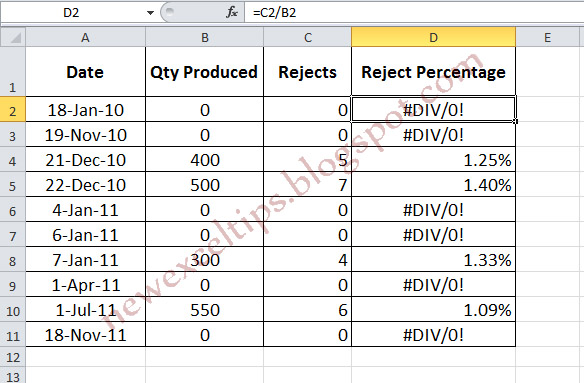
For example, refer to the table below.

The steps (How to do)
2. Drag or Copy/Paste all the necessary cells


DONE
How to Measure the Rank of a Website

The ranking of a website depends on several factors. It depends on Google Page Rank (known as PR), Alexa Traffic Rank, Complete Rank and so many. And to check the ranking status, there are thousands of extension available for internet browsers.
- First, make sure you are using Google Chrome or Firefox.
- If you are a chrome user then click here. And Firefox users can use this link.
- Chrome users will get several toolbars with Web Rank SEO. You can choose either the first one or any other toolbar as you like and then hit on Add to Chrome. And Firefox users should click on Add to Firefox button.
- Then click on install. Firefox should be restarted. But chrome doesnt need to be restarted.
- Now you are almost done. Chrome users must see this like an icon at the upper right corner. And Firefox users will get it like a horizontal bar.
Tuesday, April 1, 2014
Smashing your PC only way to prevent data theft by fraudsters
Thu, Jan 8 02:10 PM
London, Jan 8 (ANI): The safest way to stop fraudsters stealing information from old computer hard drives is to "destroy the PC with a hammer", a consumer magazine has said.
The computing magazine Which? recovered 22,000 "deleted" files from eight computers purchased on eBay.
They then used specialist software to recover files that the original owner had deleted, reports the Daily Express.
Sarah Kidner, editor of Which? Computing, warned that the risk of becoming a victim was increasing.
"Even if you delete your files, youd be surprised how easy it is to recover your personal data. Such information could bring identity thieves a hefty payday.
"It sounds extreme, but the only way to be 100 percent safe is to smash your hard drive into smithereens," she said. (ANI)
Saturday, March 22, 2014
How to Use Facebook For Business

How to Use Facebook For Business?
There are a growing number of social media sites being used by businesses in their company marketing efforts. The secret to using social media effectively is not to be everywhere, but instead to have an online presence where your current and prospective customers are online. Contrary to what many believe- Facebook is not just for college students or for personal use. Facebook is increasingly being used by companies in many creative ways such as to build their brand image, to drive traffic to their website and blogs, to announce or get feedback on new products, manage their online reputation, attract employees, communicate company information, and as a means to intercept potential prospects. For many companies, this increased company communication is leading to enhanced relationships with current and prospective customers. In this article, I will outline how a planned internet marketing approach can lead to positive results for your business. I will begin the article by addressing a few common misperceptions about Facebook that I hear most frequently from my clients. Next, I will detail how to use and set up the various sections of a Facebook account. I will conclude with several recommended applications that will add functionality to your company Facebook page.
1: Facebook is only for personal use
Each time I give presentations on using social networking sites for business there is the perception in the audience that Facebook is only useful for communicating with friends and family. Facebook started as a closed community for college students, and has not been as effective as Linkedin at highlighting the business page and advertising features. However, Facebook continues to grow in use by companies looking to reach the more than 200 million active users, and has very powerful and targeted demographic tools that help companies to hone in on their target market.
2: Facebook is only for college students
According to the Facebook Press Room page, there are more than 200 million active users on Facebook and a million new members are joining each week in the U.S. alone. Contrary to what many of my audiences believe- more than two-thirds of Facebook users are not in college. According to comscore.com, more than 50% of Facebooks users in the U.S. are over 35; the single biggest age demographic in the U.S. on Facebook is now between 35 and 44, and Facebooks fastest growing age group is 55 and older. They also reported that Facebook ranks as the top social networking site in the majority of European countries.
3: I am too busy for this, and besides-it is not worth my time
Some of the reasons why social networking sites like Facebook are increasingly being used by companies is because they provide businesses the opportunity to easily and efficiently communicate regularly with the people in their network. Networks can include people with whom they are currently doing business, people whom they would like to do business, vendors, and potential business partners.
Social networking sites like Facebook are serving as an adjunct to, and in some cases, replacement for, traditional means of communication such as newsletters and direct mail. Facebook can be used to regularly announce or get feedback on new products, spotlight new employees or existing employees accomplishments or talents, reward customer loyalty, promote special events and special offers, as well as to create partnerships. According to a Forrester Research interactive marketing online research survey (March 2009): "40% of companies surveyed expect to cut direct mail budgets, while 35% will decrease newspaper spend, and 28% will slash magazine money in order to spend more in interactive media." Some companies have reported that by using these online means of communication they have reduced their marketing budget while at the same time increasing sales.
Why Social Networking works:
What companies that use social networking sites are finding is that these sites allow them to more regularly communicate with people, vendors, clients, colleagues, and prospects, which, in turn, helps business understand their customers needs better, increase trust, and therefore build better business relationships. Most people know that Facebook has been helpful as a tool for connecting or re-connecting with friends, family and co-workers. And most understand that even the personal connections have the potential to become new business opportunities-so it makes sense that Facebook can be used to communicate with those in the business milieu.
How to Set Up a Facebook Profile:
To make use of Facebook you need to set up an account. After registering you need to do the following in order of importance:
1. Create a Profile
In order to begin to use Facebook you must create a profile detailing information about yourself. Based on site policies, you can create only 1 profile, and it must be tied to a human name, preferably your real name, not a business name. We will review setting up your business page later in this article, but first you must set up your personal profile. If you are a married female, use your maiden and married names so more people can find you. Facebook has a "Friend Finder" feature that allows users to search for people by school, company, or organization. In order for people to find you -you must so be sure to list all of your previous schools, organizations, employers, in your profile. Thoroughly complete the "About Me" section to describe your business and what services or products you offer. In the "Information" box on your profile page, you need to include links to your website address, newsletter, blog and other business information such as your company contact information, logo and a photo of yourself. Your profile page should be considered your "branding" page or your marketing campaign. If you are working for a company-you dont have to list all your personal interests-just limit your entry to listing your professional interests. You can syndicate your blog on your profile page. By doing this you are enabling any post that you make to automatically appear on your profile page and all of those people who are connected to you will see it.
2. Build Your Contact List
Facebook was created based on the concept of connecting with friends. You can send and receive "friend requests" and once accepted, your friend can view your profile and you can view theirs. To begin connecting with people that you know, you can either import your address book/ contact database, or you can also search Facebook for individual people.
You can also view the friends list of each person with whom you are connected. If you know any of your new friends connections, or you would like to know them-you can send a connection request. You can grow your friend list by inviting all your clients, business associates, customers, family, friends, co-workers, school alumni, neighbors, and anyone else you think would be interested in connecting. I would suggest also using the search feature on Facebook to look up people with whom you have lost contact. After befriending -your profile will show up on all your friends pages. Therefore, the more friends you have- the more pages your profile will appear-leading to more people who will see your page and possibly get in touch with you.
3. Communicate by using Wall Posts
Each Facebook member has a "wall" where friends can post messages. In the business networking world, this is the online equivalent of calling them on the phone. You can send a complement to a colleague on their work by writing this on their wall, comment on their new service or product offering, or communicate an upcoming training or networking opportunity.
4. Update Your Status
At the top of your Facebook page is a status box. When you post a status update, everyone in your friends list can see your update on their home page. For business owners, this is the place to share tips, promote events, post blog updates, announce new products, links to your affiliate programs, links to interesting video or audio presentations, websites, articles, and newsletters.You can add updates as often as you are able in the " Whats on you mind?" box. These will appear on all of your friends pages so ensure that they are meant for everyone on your friend list, and are professional in nature. Otherwise, you risk people removing you from their list.
5. Participate in Groups
Online groups allow you to network virtually with potential clients and peers. You can also join Groups on Facebook that are related to your work. There are groups for therapist, teachers, coaches, and every conceivable profession. You can network, and learn from experts in the field. Another way to maximize the potential and relevance of these groups is to start one of your own. There is no cost to do this and this is a great way to improve your companys visibility. For example, I started a group for mental health facility administrators in Boston. This group is now a resource for sharing best practices and may over time lead to mutual referral relationships. To access groups, start from your Facebook home page, view the list of applications and click on "Groups." You can browse through thousands of groups by area of interest, by industry and geography. There are an incredibly varied selection of topics and professions all over the map.
6. Build Your Friends List
For business purposes, it makes sense to have as many friends as possible. One way to do this is to join a group and send connection requests to fellow members with a note letting them know of your interest in connecting with them on Facebook. Just as you would with an in-person business introduction, be sure to check out their profile and learn about what they are currently doing. Networking always works best when there is a two-way exchange. Find ways you can be helpful to them such as introducing them to a colleague or potential business partner and they may likely reciprocate and return the favor. Also, create your own events page, or post on the Facebook "Events page." You can even see how many RSVP and get feedback from attendees.
7. Create Fan Pages
Because Facebook requires that a profile be designated to a person, not a business, they have instead provided the ability to create fan pages. You can create a fan page for a business, book, product, author, speaker, celebrity or just about anything else you want. To create a fan page, scroll all the way down to the bottom of Facebook and click on "Advertising" (dont worry, this is free to set-up). Next, click on "Pages" at the top of the screen. You will find some helpful explanations about how pages work, along with the link that will allow you to create your own fan page. Once your page is created you can add links, events, discussion boards and other features that make them interactive. Your updates from your fan pages will appear on your profile so your friends will know about them. You can invite people to become a "fan" of your page as an alternative to sending friend requests which will help you to further cultivate an online community
8. Use the Marketplace
Facebook has an online marketplace that allows you to list your services and products at no cost. This is a great way for you or your company to get exposure. You can also use the marketplace to find items or services that you need.
How To Set Up a Business Page on Facebook
Setting up a business page is easy. Just log in to your profile page and scroll down to the bottom of the screen. Then click on "Advertising" or by following this link: http://www.facebook.com/business That will bring up a page with the blue links one of which is called "Pages." Click on Pages, and then click on the green "Create a Page" box on the right of the screen. You can now start filling this information in to create and customize your business page.
After you create your business page, Facebook will automatically add an application called the "Page Manager" which should be located on the top and left side of your log. Again choose Facebook Pages, then choose the best category for your business. Click this link to load your business page where you can then edit and add to the existing content.
It is important that you choose the name of your Facebook page carefully because the page name will become your key word search terms, and is the only text that is used in a search on a Facebook page. Once your page is in place, you can add applications that help to enhance how you represent your company in your own unique way. To find applications for Facebook, click on "Applications" in the upper left corner of your page, or search for them at this link: http://www.facebook.com/apps Applications are fairly easy to install and to set up. If you have difficulty with any one application-please note that there is often more than one application available to accomplish the same task.
Facebook Applications for Business:
Simply RSS : This allows you to display up to eight RSS feeds on your Facebook page and display the feeds from your businesss main site and newsrooms.
Upcoming: Add all of your events to upcoming.org, and you can easily display them on your Facebook page with Upcomings Facebook application.
My Flickr: Display photos from your Flickr account using this application. These photos can include logos, product photos, photos from events, etc.
Posted Items Pro: Allows you to embed multiple YouTube, Yahoo, and Google Videos, music mp3s, sites, files, and more onto your profile and Facebook pages. You can add any variety of these elements, making it great for a media center or press section.
Twitter APP: If you have a Twitter account this application will automatically pull your tweets into your Facebook status, and it automatically installs a Twitter-themed icon letting all you friends on Facebook know that you are on Twitter. It also saves you time in updating and ensures that you have some profile activity to keep you relevant. If you are not on Twitter yet-you can add this at any time.
By implementing these applications you will be creating an interactive page that gives visitors a more complete understanding of your business.
Make the Time to Stay Relevant
In order to stay relevant on Facebook, you need to continually update your Page and use the site. If you do not have the time needed to do this consistently- then I would suggest you hire a copywriter or social media consultant to help. The more actions you take, the more you appear in a fans News Feed. This keeps you in their mind, and in their friends feeds when they interact with you. But updating content will do more than keep you on the News Feed; it will also help make your Facebook Page one that people will return to by offering fans an incentive to continue to read your content and return to your page. There are many ways to do this such as providing exclusive content, special promotional pricing, exclusive contests, product previews, or privileged access to company events.
I hope this information has been helpful to you in getting started in using Facebook. Make no mistake about it-social networking is not a passing fad. Facebook, and other social media sites are here to stay. So regardless of whether you make use of all the social networking sites- you cannot discount the recent research indicating that customers are increasingly going online to gather company and product information, compare prices, and place orders. As with any new technology social networking will take time and effort for businesses to fully benefit from it; however, it is my belief that this time and effort, if done consistently and in a planned, thoughtful manner, will be time well spent.
How to Log on to PC If You Forgot Windows 7 Password

Windows Password could help people protect their important data that is stored in their computer. But many people are forgetful and easy to forget their password. So what should you do to log on to PC when you forgot Windows 7 password? show you 3 solutions.
Method 1: Reset Windows 7 Password with Password Reset Disk
A strong password can be easily forgotten or lost, creating a password reset disk is necessary. If you forget Windows 7 password, you can use the password reset disk to reset the password. With it, you can easily reset your Windows 7 password and log on to your PC in a minute.
Creating a password reset disk in case of forgetting password is necessary. But there are still many people forget to create one in advance. So it is highly recommend that creating a password reset disk when you create your logon password.
Method 2: Reset Windows 7 Password with Third-party tool
In addition to reset Windows 7 password with password reset disk, you can also reset the forgotten password with third-party Windows password reset software. Windows password reset software allows you to reset forgotten Windows 7 password by creating a bootable CD/DVD or USB flash drive. Here we suggest Rekeysoft Windows Password Recovery.
Rekeysoft Windows Password Recovery is professional Windows password reset tool. It provides you fast and secure way to reset forgotten password in any versions of Windows, including Windows 7/Vista/XP etc. You only need to create a bootable CD/DVD or USB flash drive.
Method 3: Re-install Windows 7 Operating System
If you cannot log on to computer with the methods above, you can re-install Windows 7. It is the last choice for you. Insert the Windows 7 installation disc into your computer and restart it. Once the computer is running, follow the onscreen instructions to re-install Windows 7.
The methods above are effective for you when you forgot windows 7 password. And they can be also useful when you forgot Windows password of Windows Vista and Windows XP. You can choose one of them when you lost of forgot Windows 7 password.